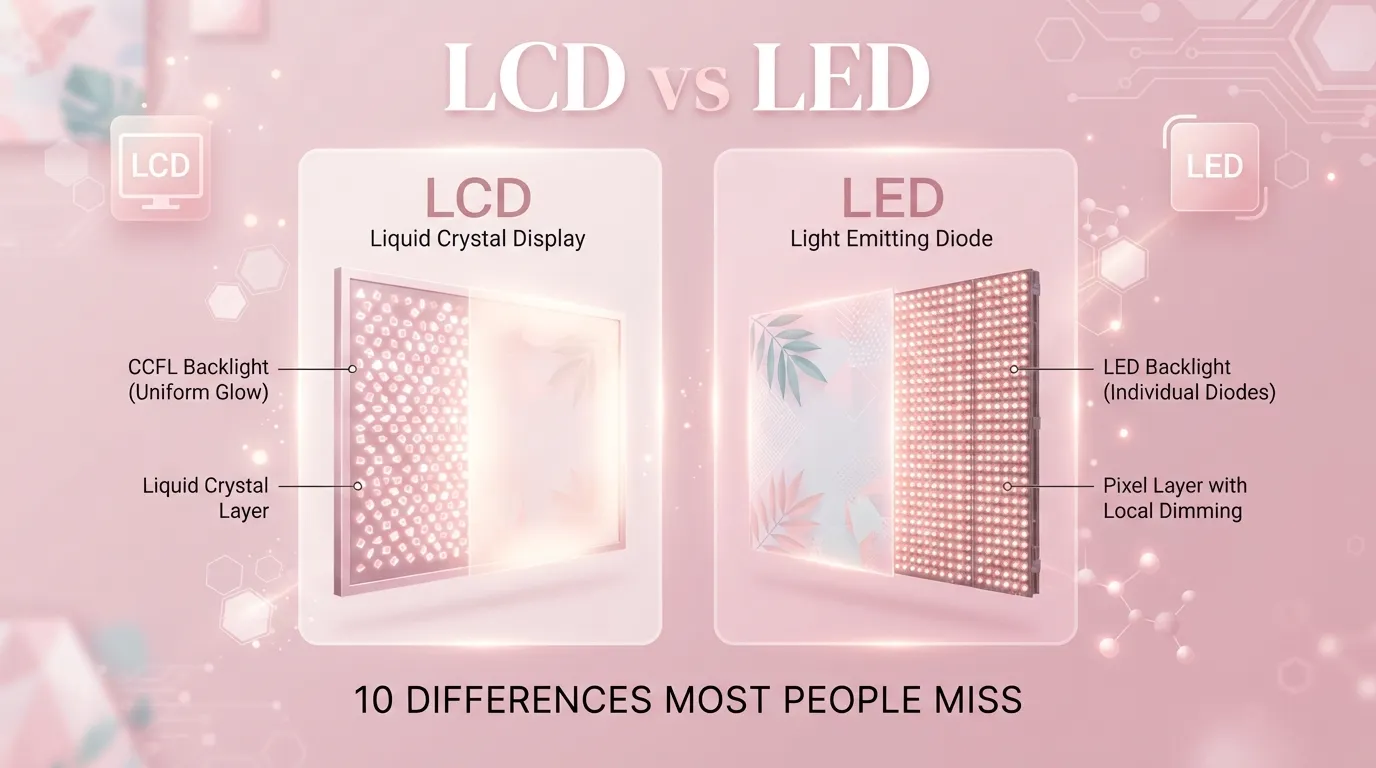
LCD screens use a fluorescent backlight to light up the picture, while LED screens use small LED lights for the backlight, giving LED screens better brightness, contrast, and energy efficiency.
Most people say “LCD” and “LED” like they are two totally different types of screens. They are not. Every LED TV is actually an LCD TV. The real difference between LCD and LED comes down to one part inside the screen: the backlight.
Here is a quick story. Sana wanted a new TV for her living room. She saw one labeled “LCD” and one labeled “LED” sitting side by side in the store. She assumed LED must be a brand new, unrelated technology, so she picked the LCD because it was cheaper. Later she found out the LED screen would have given her sharper colors and lower electricity bills for almost the same price.
So what actually separates these two screens, and which one deserves your money? Let’s break down the difference between LCD and LED step by step, in plain English.
Key Difference
The main difference between LCD and LED sits in the backlight. Standard LCD screens use CCFL tubes (a type of fluorescent light) to light the picture from behind. LED screens use small LED bulbs instead, which makes them thinner, brighter, and more efficient. Keep reading, we break down all 10 differences in plain, simple terms below.
Why Is This Difference Important to Know?
Picking the wrong screen can waste money and hurt your eyes over time. If you understand the difference between LCD and LED, you can pick a screen that fits your budget, your room lighting, and how you actually use it, whether that’s gaming, movies, or office work. This matters for casual shoppers and tech professionals alike, since screen choice affects picture quality, power bills, and even how long the device lasts.
10 Points of Difference Between LCD and LED
1. Basic Definition and Meaning
LCD stands for Liquid Crystal Display. It refers to the layer of liquid crystals that block or allow light to pass through. LED stands for Light Emitting Diode, which describes only the backlight source used inside many modern LCD screens. A hospital monitor from the early 2000s used plain LCD tech. A 2024 smart TV from Samsung uses LED backlit LCD tech.
2. Origin and Main Components
LCD technology came first, built from a glass panel, liquid crystals, and a fluorescent tube light. LED technology came later as an upgrade to that same panel, replacing the tube with tiny diodes. Sharp released early LCD TVs in the 1990s. Sony introduced some of the first LED backlit TVs in 2004.
3. Process: How It Is Made
Making an LCD screen means sandwiching liquid crystals between two glass layers, then adding a fluorescent light behind them. Making an LED screen follows the same steps but swaps that fluorescent light for rows of tiny LED bulbs. A CCFL tube factory line looks very different from an LED chip assembly line, even though both feed into similar looking TVs.
4. Time Involved and Duration
LCD screens with CCFL backlights typically last around 30,000 to 60,000 hours before the light dims noticeably. LED backlit screens often last 50,000 to 100,000 hours, roughly double the lifespan. A classroom projector screen from 2010 using LCD tech may already show dimming today. A 2018 LED monitor in the same room likely still looks bright.
5. Flavor, Feel, or Output Quality
LCD screens tend to look dimmer with washed out blacks because the fluorescent light cannot turn off in specific spots. LED screens, especially full array models, produce deeper blacks and punchier colors because sections of lights can dim independently. A basic LCD computer monitor looks flat in a dark room. An LED gaming monitor with local dimming looks vivid in that same room.
6. Primary Use Cases
Older LCD tech still shows up in budget calculators, basic digital clocks, and low cost monitors. LED tech now dominates TVs, laptops, smartphones, and high end monitors. A $15 kitchen timer likely uses a tiny LCD screen. A $700 gaming laptop almost certainly uses an LED backlit display.
7. Effect or Impact
Choosing LCD over LED can mean a higher electricity bill over time, since CCFL backlights use more power. Choosing LED can lower energy costs and reduce heat output in the room. A family running an old LCD TV for 6 hours a day pays noticeably more per year than a family running an LED TV the same amount.
8. Degree of Specificity or Precision
“LCD” is a broad category describing the display technology itself. “LED” is a more specific term describing only the backlight method used within that LCD category. Saying “I bought an LCD” tells you little about brightness or efficiency. Saying “I bought an LED backlit LCD” tells you exactly what kind of light source is inside.
9. Can They Replace Each Other?
Not directly, since LED screens are a type of LCD, not a separate rival. You cannot buy a “pure LED display” for a TV in the way people often imagine, that phrase almost always means an LED backlit LCD panel. Retailers label products as LED mainly for marketing, while the liquid crystal layer underneath still works the same way it does in any LCD.
10. Long Term Results and Lasting Impact
Over several years, LED backlit screens tend to hold their brightness and color accuracy better than plain CCFL LCD screens. This means less noticeable image degradation and fewer early replacements. Office buildings that switched from LCD to LED monitors around 2015 report fewer screen replacements today compared to buildings that kept older CCFL units running.
Nature and Behaviour
LCD, in its original CCFL form, behaves like a steady but somewhat dim lamp. It lights the whole screen evenly but cannot adjust brightness in specific zones, so dark scenes look grayish rather than truly black.
LED backlit LCD behaves more like a smart lighting system. It can dim or brighten small zones of the screen independently, giving richer contrast and a more responsive feel, especially in fast moving content like sports or games.
Why Do People Confuse Them?
People confuse LCD and LED mainly because store marketing treats “LED” as if it were a completely separate technology from “LCD,” when it is really just a backlight upgrade. Packaging rarely explains that every LED TV is technically an LCD TV underneath. Sales staff sometimes reinforce this confusion to upsell products. One shopper we heard about returned an “LED” monitor to the store, insisting it must be defective since it still used liquid crystals, not realizing that was expected all along.
Comparison Table
| Feature | LCD | LED |
|---|---|---|
| Definition | Screen using liquid crystals and a fluorescent backlight | LCD screen using LED bulbs as the backlight |
| Origin | Developed in the 1970s and 80s | Popularized in TVs starting around 2004 |
| Process | Liquid crystal layer plus CCFL tube light | Liquid crystal layer plus small LED bulbs |
| Duration | Around 30,000 to 60,000 hours | Around 50,000 to 100,000 hours |
| Output | Dimmer, weaker contrast | Brighter, deeper contrast |
| Main Use | Budget devices, older monitors | TVs, laptops, phones, modern monitors |
| Impact | Higher power use over time | Lower power use over time |
| Interchangeable? | Not truly, LED is a type of LCD | Not truly, LED is a type of LCD |
| Long Term Result | Faster dimming and wear | Slower dimming, longer usable life |
| Similarity | Both rely on a liquid crystal layer | Both rely on a liquid crystal layer |
| Key Difference | Uses a fluorescent tube backlight | Uses small LED bulbs as the backlight |
📌 Save this for later, bookmark this page or share it with someone who always mixes up LCD and LED.
Which Is Better and When?
Plain CCFL LCD makes sense only when budget is the top priority and picture quality barely matters, like a basic office monitor used for spreadsheets. LED backlit LCD is the smarter pick almost everywhere else, from home theaters to gaming setups, since it delivers brighter images, richer color, and lower running costs. For most shoppers today, LED is simply the better version of the same core LCD technology.
Quick Decision Guide
Choose LCD (CCFL) if:
- You only need a very cheap basic screen
- Picture quality is not a priority at all
- You are shopping for old spare parts or repairs
- You want the lowest possible upfront price
Choose LED if:
- You want brighter, richer colors
- You care about energy bills over time
- You watch movies, sports, or play games often
- You want a longer lasting screen
Still unsure? Drop your question in the comments, we answer every single one.
Metaphors and Similes
LCD is like an old lamp with one switch, it lights the whole room the same way no matter what. LED is like a smart lighting system with multiple switches, adjusting brightness zone by zone. Comparing LCD to LED is like comparing a basic flashlight to a smart adjustable headlamp, both light the way, but one does it far more precisely.
Connotative Meaning
LCD carries a slightly dated feel now. Positively, it suggests reliability and simplicity, like an old calculator that never breaks. Negatively, it can suggest outdated or dim, like a “cheap LCD monitor.” Neutrally, it just names the underlying screen category.
LED carries a modern, premium feel. Positively, it suggests efficiency and sharp picture quality, like a “stunning LED display.” Negatively, in rare cases it can suggest marketing hype over real substance. Neutrally, it simply names the backlight type used.
Idioms and Proverbs
“Bright as an LED” has become a casual way to describe something vivid or eye catching, as in “her presentation slides were bright as an LED.” “Dim as an old LCD” works as a coined expression for something outdated, as in “his flip phone screen was dim as an old LCD.” “Same screen, different light” could serve as a coined proverb summing up the whole LCD versus LED debate.
FAQ
Q1: What is the main difference between LCD and LED?
The main difference between LCD and LED is the backlight. LCD traditionally uses a fluorescent tube, while LED uses small LED bulbs, giving brighter and more efficient screens overall.
Q2: Can LCD be used instead of LED?
Yes, but expect dimmer picture quality and higher power use. LCD still works fine for simple tasks, but it falls short for movies, gaming, or bright rooms compared to LED.
Q3: Which is better, LCD or LED?
LED is generally better since it offers brighter images, deeper contrast, and lower energy costs. Remember, LED is really just an upgraded type of LCD, not a separate rival technology.
Q4: How long does LCD or LED last?
Plain CCFL LCD screens typically last 30,000 to 60,000 hours. LED backlit screens usually last 50,000 to 100,000 hours, roughly double the lifespan in most cases.
Q5: Why do people mix up LCD and LED?
Marketing treats LED as a totally separate product category, even though it is simply an LCD screen with LED backlighting. This labeling choice causes most of the ongoing confusion among shoppers.
You might also like: → OLED vs QLED: What’s Actually Different → How to Choose the Right Monitor for Gaming and Work
Real World Importance
Knowing the difference between LCD and LED helps you avoid overpaying for outdated tech or underpaying for something that will disappoint you daily. It matters when buying a TV for movie nights, a monitor for long work sessions, or even a car dashboard display. Small screen choices add up to real comfort, cost savings, and satisfaction over years of daily use.
Conclusion
At the end of the day, the difference between LCD and LED comes down to one simple thing: the backlight. LCD relies on older fluorescent tube lighting, while LED uses small, efficient bulbs that create brighter, richer, longer lasting images. Every LED screen is technically an LCD screen, just with a smarter light source inside. Once you understand that one fact, the whole confusing shopping aisle suddenly makes sense.
You clearly understand the details now, and that puts you ahead of most shoppers standing in the store aisle. Next time you’re picking a screen, you’ll know exactly what you’re paying for.
Explore More: Vendor vs Supplier: 10 Differences Most People Miss

I’m Ayesha Sadiqah, and I’m passionate about answering one simple question: “What’s the difference?” Through clear comparison guides, I help readers understand commonly confused words, products, concepts, and everyday topics. My goal is to make complex ideas easy to understand with accurate, practical, and reader-friendly explanations.