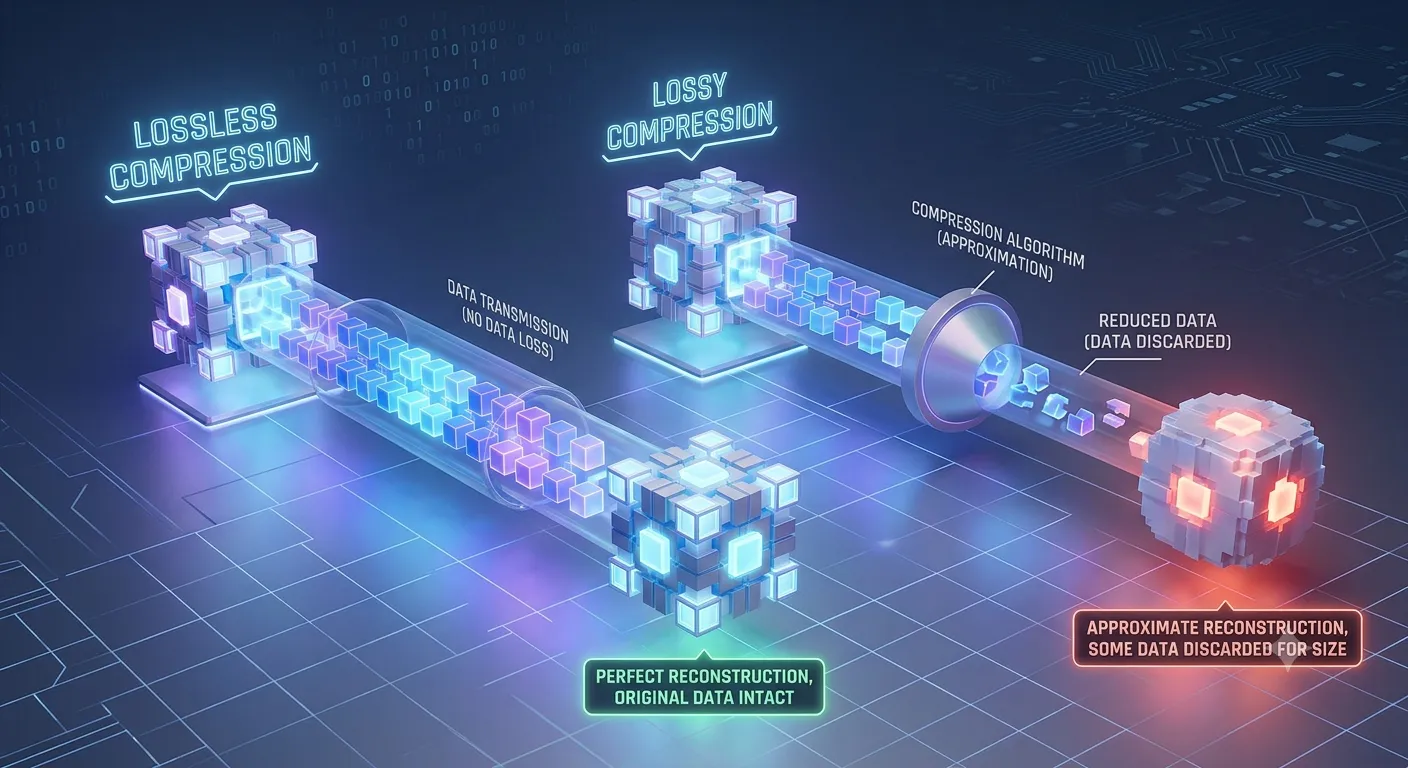
Lossy compression removes some data to make files smaller, while lossless compression keeps all original data so it can be perfectly restored.
Most people think lossy and lossless are just two technical terms for file compression. They are not—and the difference can affect audio quality, image clarity, storage space, and even professional work.
A few years ago, Jake was organizing thousands of vacation photos on his laptop. To save space, he compressed them without understanding the settings. Later, he noticed many pictures looked blurry. He had accidentally used a lossy format instead of a lossless one.
That simple mistake highlights the importance of understanding the difference between lossy and lossless. Whether you work with music, images, videos, or documents, knowing the difference between lossy and lossless can help you make smarter choices. In this guide, we’ll break down the difference between lossy and lossless in plain English with examples, tables, and practical advice.
Key Difference
The main difference is simple: lossy compression permanently removes some data, while lossless compression preserves every bit of the original data.
Lossy files are usually much smaller, but they sacrifice some quality. Lossless files remain accurate copies of the original but take up more storage space.
Keep reading—we break down all 10 differences in plain, simple terms below.
Why Is This Difference Important to Know?
Understanding the difference between lossy and lossless helps you choose the right format for your needs. A photographer may want maximum image quality, while a social media user may prioritize smaller file sizes. Musicians, designers, students, and businesses all face this choice regularly. Picking the wrong format can lead to quality loss, wasted storage, or unnecessary file sizes.
Before We Compare the 10 Differences
Both compression methods have important uses. The best choice depends on whether you value quality or storage savings more.
If you also want to understand digital file formats, check out our guide: Difference Between PNG and JPEG.
10 Points of Difference
1. Basic Definition and Meaning
Lossy compression reduces file size by removing some data permanently. Once removed, that information cannot be recovered.
Lossless compression reduces file size without removing data. The original file can be restored exactly.
Examples:
- MP3 audio uses lossy compression.
- FLAC audio uses lossless compression.
2. Origin / Source / Main Components
Lossy methods were developed to save storage and bandwidth when devices had limited capacity. They focus on removing information that people may not easily notice.
Lossless methods were created to preserve accuracy while still reducing file size.
Examples:
- JPEG images use lossy technology.
- PNG images use lossless technology.
3. Process How It Is Made or Done
Lossy compression analyzes data and removes details considered less important. The file becomes smaller but changes permanently.
Lossless compression reorganizes data more efficiently without deleting anything.
Examples:
- Spotify streams many songs using lossy formats.
- ZIP archives use lossless compression.
4. Time Involved / Duration
Lossy files generally download and transfer faster because they are smaller.
Lossless files may take longer to upload, download, or share because they contain more data.
Examples:
- A compressed JPEG uploads quickly to Instagram.
- A RAW photo archive takes longer to transfer.
5. Flavor, Feel, or Output Quality
Lossy compression may slightly reduce image sharpness, sound detail, or video quality.
Lossless compression keeps the original quality intact.
Examples:
- YouTube videos often use lossy compression.
- Professional photo archives often use lossless formats.
6. Primary Use Cases
Lossy compression works best when storage and speed matter most.
Lossless compression works best when preserving quality is essential.
Examples:
- Netflix uses lossy video compression.
- Medical imaging systems often use lossless storage.
7. Effect or Impact
Lossy compression saves significant storage space but may reduce quality.
Lossless compression protects quality but requires more storage.
Examples:
- A smartphone can store more MP3 songs.
- A music studio may store FLAC master recordings.
8. Degree of Specificity or Precision
Lossy formats sacrifice some precision to achieve smaller sizes.
Lossless formats maintain complete accuracy and detail.
Examples:
- JPEG removes some image information.
- TIFF can preserve image data precisely.
9. Can They Replace Each Other?
Sometimes, yes—but not always.
For casual use, lossy files may work perfectly. For editing, archiving, or professional work, lossless files are often preferred.
Examples:
- Facebook photos can use JPEG.
- Graphic designers often prefer PNG or TIFF.
10. Long-Term Results / Lasting Impact
Repeated editing and saving of lossy files can reduce quality over time.
Lossless files remain unchanged even after multiple saves and transfers.
Examples:
- Repeatedly saving a JPEG can cause visible degradation.
- Repeatedly saving a PNG preserves quality.
Nature and Behaviour
Lossy compression is efficient and practical. It focuses on reducing file size as much as possible, even if some information is lost.
Lossless compression is accurate and reliable. It prioritizes preserving every detail while still reducing storage requirements.
Why Do People Confuse Them?
People confuse lossy and lossless because both are compression methods. Both make files smaller, and both are used for images, audio, and video.
Another reason is that quality differences are not always obvious. For example, a person may view a JPEG photo and assume it is identical to the original image when some data has actually been removed.
Comparison Table
| Feature | Lossy | Lossless |
| Definition | Removes some data | Preserves all data |
| Origin | Storage-saving focus | Accuracy-preserving focus |
| Process | Deletes selected information | Reorganizes information |
| Duration | Faster transfers | Slower transfers |
| Output | Slightly reduced quality | Original quality retained |
| Main Use | Streaming and sharing | Editing and archiving |
| Impact | Saves more space | Uses more space |
| Interchangeable? | Sometimes | Sometimes |
| Long-term Result | Quality may decline | Quality remains intact |
| Similarity | Both compress files | Both compress files |
| Key Difference | Data is removed | Data is preserved |
📌 Save this for later—bookmark this page or share it with someone who always mixes up lossy and lossless.
Which Is Better and When?
Lossy compression is better when you need smaller files and faster sharing. For example, uploading photos to social media usually works well with JPEG files.
Lossless compression is better when quality matters most. For example, photographers editing images or musicians producing studio recordings often choose lossless formats.
Quick Decision Guide
Choose Lossy if:
☑ Storage space is limited
☑ Fast uploads matter
☑ Quality loss is acceptable
☑ Content is for everyday viewing
Choose Lossless if:
☑ Quality must stay perfect
☑ You plan to edit files
☑ Long-term archiving matters
☑ Professional work requires accuracy
Still unsure? Drop your question in the comments—we answer every single one.
Metaphors and Similes
Lossy compression is like trimming branches from a tree to make it smaller.
Lossless compression is like neatly folding a large blanket into a compact package.
Together, they are like two suitcases: one throws away items to save space, while the other packs everything carefully.
Connotative Meaning
Lossy
- Positive: Efficient and space-saving. Example: “MP3 files are easy to store.”
- Negative: May lose quality. Example: “The image looks slightly blurry.”
- Neutral: A common compression method. Example: “The file was saved as JPEG.”
Lossless
- Positive: Accurate and high quality. Example: “The recording sounds exactly like the original.”
- Negative: Larger file sizes. Example: “The archive takes more storage.”
- Neutral: A preservation-focused format. Example: “The image was saved as PNG.”
Idioms and Proverbs
- “Don’t throw the baby out with the bathwater.” Lossless compression tries to keep everything valuable.
- “Less is more.” Lossy compression often follows this idea to save space.
- [Coined Expression] “Shrink smart, not hard.” A designer used this phrase when choosing between JPEG and PNG.
FAQ
1. What is the main difference between lossy and lossless?
Lossy compression removes some data permanently to reduce file size. Lossless compression keeps all original data and allows the file to be restored perfectly.
2. Can lossy be used instead of lossless?
Yes, for many everyday tasks like streaming music or sharing photos. However, professional editing, archiving, and high-quality production often require lossless formats.
3. Which is better—lossy or lossless?
Neither is universally better. Lossy is better for saving space and bandwidth. Lossless is better when preserving quality is the top priority.
4. How long does lossy / lossless last?
Both can last indefinitely as file formats. The difference is that repeated editing of lossy files may reduce quality, while lossless files maintain their original quality.
5. Why do people mix up lossy and lossless?
People often focus on file size rather than data preservation. Since both methods compress files, many users assume they work the same way.
Related Reading:
You might also like:
→ Difference Between PNG and JPEG — /difference-between-png-and-jpeg/
→ Difference Between WAV and MP3 — /difference-between-wav-and-mp3/
Real-World Importance
Knowing the difference between lossy and lossless helps you make smarter decisions when storing photos, streaming music, editing videos, or managing business files. Students, photographers, content creators, and companies all benefit from choosing the right compression method for their goals.
Conclusion
Lossy and lossless compression both reduce file sizes, but they do so in very different ways. Lossy compression removes some information permanently to create much smaller files. Lossless compression keeps every piece of data intact while still reducing size. The right choice depends on your priorities—storage efficiency or maximum quality.
Understanding the difference between lossy and lossless helps you avoid mistakes, protect important files, and optimize storage. Now that you know the difference, you’ll never mix them up again. If this guide helped, consider sharing it with someone who works with photos, audio, or video files.
Meta Description
Confused about the difference between lossy and lossless? Discover the key differences, examples, comparison table, and quick decision guide in plain English.
Read More:
Difference Between Restored and Refurbished: What’s the Difference?

I’m Rubab, an SEO content writer specializing in high-quality comparison articles that simplify complex topics and highlight key differences with clarity and accuracy. My content combines in-depth research, proven SEO strategies, and a reader-first approach to deliver valuable insights across language, technology, health, food, and lifestyle topics.
🔍📈 Turning complex comparisons into clear, search-friendly content that informs, engages, and ranks. ✨🏆